1. If your Apple Watch asks you to "Enable Health access to continue," or a round won't start on the watch, you need to grant Apple Health access.
The Golf Pad Apple Watch app now records each round as a Workout, which requires access to Apple Health. Until you allow it, the watch can't start the round.
On your iPhone, open Settings and go to:
- Apps > Health > Data Access & Devices
- tap Golf Pad
- enable Workouts
2. If the Apple Watch app shows "Connecting" instead of distances, try these steps:
- delete Golf Pad on the Apple Watch
- reboot your iPhone
- install Golf Pad on your watch again
- if this doesn't help, send us some diagnostic information: go to Golf Pad preferences > Help and support > Question or problem? > Contact us via email
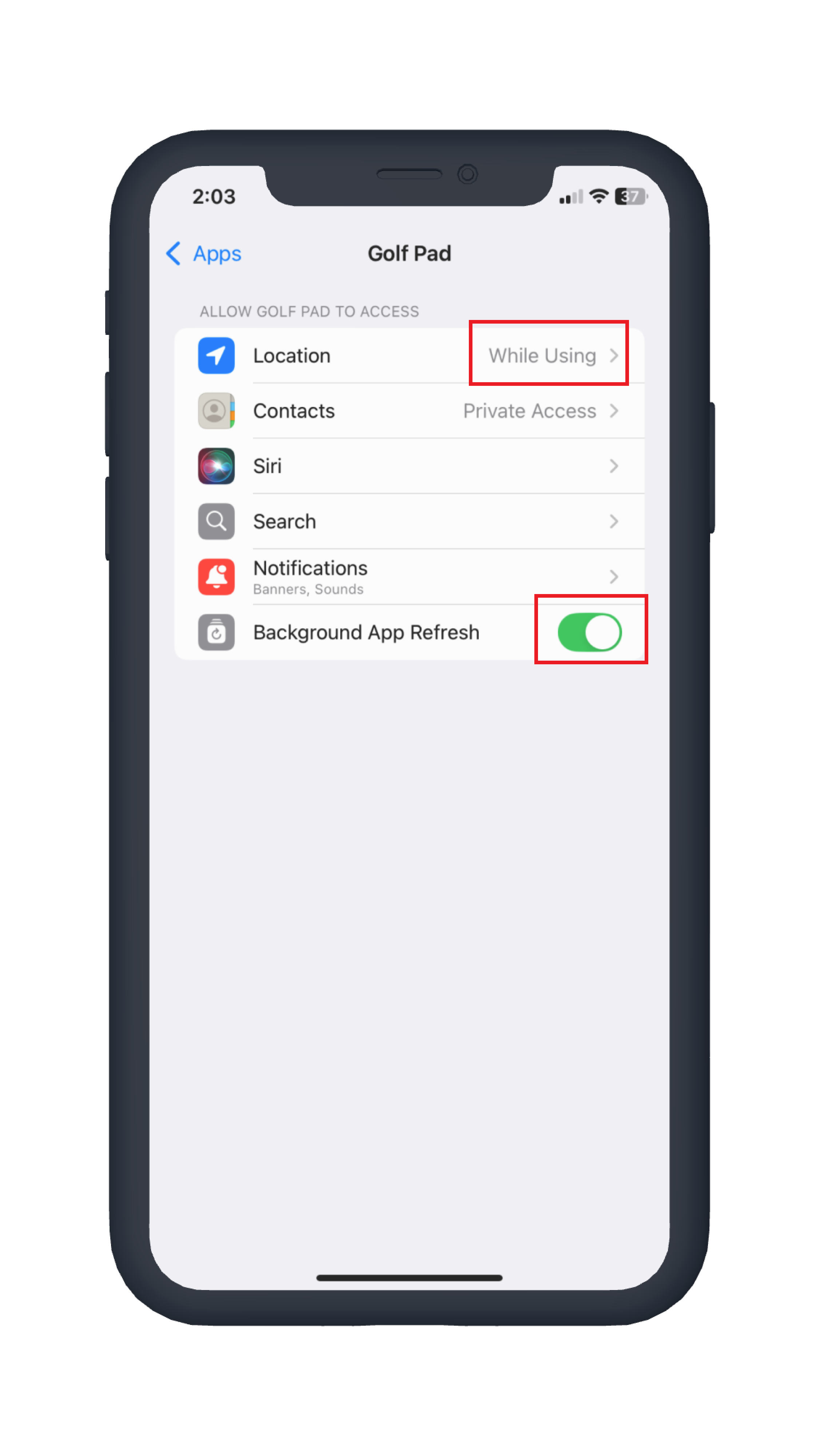
3. If rangefinder distances don't update on Apple Watch automatically while you aren't actively using the Golf Pad app on your phone, make sure permissions are set up correctly for Golf Pad on your iPhone.
Open iPhone Settings, scroll down and select Golf Pad, then verify that:
- Location is set to While Using
- Background App Refresh is enabled
Was this article helpful?
That’s Great!
Thank you for your feedback
Sorry! We couldn't be helpful
Thank you for your feedback
Feedback sent
We appreciate your effort and will try to fix the article